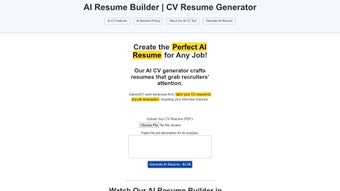

Download GabrielCV – AI Resume Optimizer, ATS‑Friendly, Free Online Tool
Overview
In today’s hyper‑competitive job market, a well‑crafted resume can be the decisive factor that lands you an interview. GabrielCV steps into this arena as a powerful AI‑driven web application built specifically to transform ordinary resumes into targeted, high‑impact documents that speak directly to the requirements of any job posting. By leveraging advanced natural‑language processing, GabrielCV reads both your existing resume and the job description you provide, then rewrites sections, reorders achievements, and inserts industry‑specific keywords that increase the likelihood of passing through Applicant Tracking Systems (ATS). The platform is designed with user privacy at its core—none of the uploaded files or pasted job descriptions are stored beyond the immediate processing session, ensuring that your personal data remains confidential. Whether you are a fresh graduate looking for your first role, a mid‑career professional aiming for a promotion, or an executive seeking a strategic position, GabrielCV adapts its suggestions to match the tone, style, and expectations of any sector, from technology and finance to healthcare and creative industries. The tool’s simplicity—just upload, paste, click, and download—removes the need for costly professional resume writers while still delivering results that meet best‑practice standards in resume design, readability, and keyword density. In the sections that follow, we will explore the core features, walk you through the quick setup process, examine system compatibility, weigh the pros and cons, and answer the most common questions users have about this innovative resume‑enhancement solution.
Key Features & Benefits
- AI‑Powered Skill Alignment: Analyzes your resume against the job description to highlight gaps and recommend precise skill matches.
- ATS‑Friendly Formatting: Generates clean, structured layouts that are easily parsed by most Applicant Tracking Systems.
- Keyword Optimization: Inserts high‑impact, role‑specific keywords without over‑stuffing, improving searchability.
- Industry‑Neutral Templates: Offers a selection of professional templates suitable for any sector, from tech startups to corporate finance.
- One‑Click Resume Generation: After analysis, the AI produces a ready‑to‑download document in PDF or DOCX format.
- Data Privacy Assurance: No data is retained on the server after processing; all files are deleted instantly.
- Multilingual Support (Beta): Supports English, Spanish, and French resume inputs, expanding its usefulness for global job seekers.
- Free Core Version: All essential features are available at no cost, with optional premium upgrades for advanced styling.
Each of these features is built around a central philosophy: to give every job seeker a competitive edge without the need for expensive consultants. The AI engine behind GabrielCV is trained on millions of job postings and resume samples, allowing it to recognize subtle patterns such as preferred action verbs, quantifiable achievements, and industry jargon. When you upload your resume, the platform first parses the document to extract your existing experience, education, and skill sets. It then cross‑references this data with the job description you paste, pinpointing any mismatches and suggesting where you can add or emphasize relevant information. The result is a document that feels personalized, coherent, and strategically aligned with the employer’s expectations. Moreover, the ATS‑friendly formatting follows the best practices recommended by major HR software providers—simple fonts, clear headings, and minimal use of tables or graphics—ensuring that automated scans focus on your content rather than being tripped up by complex design elements. The keyword optimization engine does more than just sprinkle buzzwords; it evaluates keyword relevance, placement, and density, providing a balanced approach that satisfies both human recruiters and machine algorithms. Together, these capabilities make GabrielCV a comprehensive, end‑to‑end solution for resume refinement.
Getting Started & System Compatibility
GabrielCV is a cloud‑based service, which means you do not need to download or install any software on your computer. All you need is a modern web browser and an active internet connection. The setup process is intentionally streamlined to cater to users of all technical backgrounds. Here’s a step‑by‑step guide to get your resume optimized in under five minutes:
- Visit the GabrielCV website: Open your preferred browser (Chrome, Firefox, Edge, Safari) and navigate to gabrielcv.com.
- Create a free account (optional): While you can use the tool anonymously, registering allows you to save past sessions for reference.
- Upload your current resume: Click the “Upload Resume” button and select a PDF or DOCX file from your device.
- Paste the job description: Copy the full posting from the employer’s website and paste it into the dedicated text box.
- Choose a template: Select one of the ATS‑friendly templates that matches your industry or personal style.
- Click “Optimize”: The AI begins processing—this typically takes 15–30 seconds for standard resumes.
- Review and download: Preview the AI‑generated resume, make any manual tweaks if desired, then download the final version in PDF or DOCX format.
Because GabrielCV runs entirely in the browser, it is compatible with virtually any operating system that supports modern web standards. This includes Windows 10/11, macOS Monterey and later, Linux distributions with up‑to‑date browsers, as well as mobile platforms such as Android 8+ and iOS 13+. The platform is responsive, meaning you can perform the entire optimization workflow from a tablet or smartphone without losing functionality. For users concerned about browser compatibility, GabrielCV supports the latest versions of Chrome, Firefox, Edge, and Safari, and it gracefully degrades on older browsers while still offering core functionality.
Supported Systems: Windows, macOS, Linux, Android, iOS (via web browser)
If you encounter any issues during the upload or optimization phase, GabrielCV provides a live chat widget and a detailed help center with troubleshooting articles. The platform also offers an optional premium subscription that unlocks priority processing, advanced template customization, and a dedicated support line. However, the free tier remains fully capable of delivering a polished, ATS‑ready resume for most users. By eliminating the need for downloads, installations, or frequent software updates, GabrielCV ensures a frictionless experience that can be accessed from any device—perfect for job seekers who are constantly on the move.
Pros, Cons & Frequently Asked Questions
Pros
- AI-driven skill and keyword alignment dramatically improves ATS pass rates.
- Completely web‑based – no installation required, works on all major operating systems.
- Free core version provides essential resume optimization without hidden fees.
- Data privacy is prioritized; files are deleted after processing.
- Quick turnaround – most resumes are optimized in under a minute.
Cons
- Advanced template customization is limited to premium subscribers.
- Multilingual support is still in beta and may not cover all language nuances.
- Reliance on an internet connection; offline use is not possible.
- Complex formatting (e.g., graphics‑heavy designs) may be simplified to meet ATS standards.
- Some users may prefer a human touch for nuanced storytelling beyond AI suggestions.
How does GabrielCV keep my data secure?
GabrielCV processes all uploads on secure, encrypted servers and automatically deletes every file and job description as soon as the AI finishes generating the new resume. No personal data is stored long‑term, and the platform complies with GDPR and CCPA privacy standards.
Can I use GabrielCV on my mobile phone?
Yes. Because GabrielCV is a responsive web application, you can upload a resume, paste a job description, and download the optimized document directly from Android or iOS browsers such as Chrome, Safari, or Edge.
Is there a limit to how many resumes I can optimize for free?
The free tier allows up to three optimizations per month, which is sufficient for most job seekers. If you need unlimited access, the premium subscription removes this restriction.
Will the AI change my personal writing style?
GabrielCV aims to preserve your voice while aligning content with the job posting. It suggests edits rather than overwriting everything, allowing you to accept, reject, or modify each recommendation.
Do I need any special software to open the downloaded resume?
The output files are available in PDF and DOCX formats. PDFs can be opened with any standard viewer, while DOCX files require Microsoft Word, Google Docs, or any compatible word processor.
Final Verdict & Call to Action
GabrielCV delivers on its promise to make resume optimization fast, intelligent, and accessible to everyone. By combining sophisticated AI analysis with ATS‑compliant formatting, it bridges the gap between a generic resume and a job‑specific masterpiece. The free version already offers enough power to boost your chances of getting noticed, while the optional premium tier adds extra polish for those who want to go the extra mile. Whether you are launching your career, pivoting to a new industry, or aiming for a senior leadership role, GabrielCV equips you with the tools to present your experience in the most compelling way possible. The platform’s emphasis on privacy, cross‑device compatibility, and ease of use makes it a standout choice among the crowded field of resume builders.
Ready to transform your resume in minutes? Visit GabrielCV now, upload your current CV, paste the job description you’re targeting, and let the AI do the heavy lifting. Download the tailored, ATS‑friendly version, and start applying with confidence. Your next interview could be just one click away.



.png)



